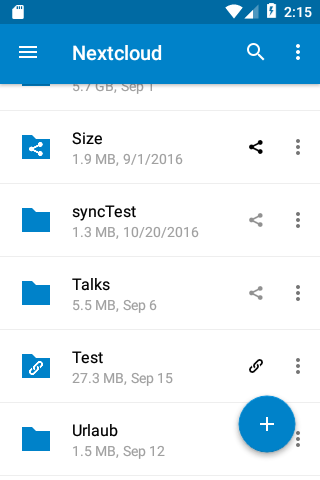
The Nextcloud Android app v3 delivers Android 8 Oreo support, End-to-end Encryption, much better handling of local and remote files, many fixes for the auto-upload and much more in over 180 pull requests reviewed and merged over the last months. It is now available on the app store and you can wait for the automatic update or get it manually now!
Major changes
The new app introduces a number of major changes like support for Android « Oreo » 8 and the integration of the Nextcloud End-to-end Encryption.
Another noticeable change will be the detection of ‘walled gardens’, like a hotel or airport wifi login wall: no need to try to sync there until you logged in! The Nextcloud app now also supports IPv6 and there have been many fixes and improvements to the auto-upload feature for images and videos.
UI improvements
There has also been a lot of UI work. One example is to make it possible to directly execute actions on a single file, rather than having to select it first and go through the menu. As you see in the screenshot, each file now has a three-dot menu from where you can directly share, move, download, favorite and more.
You can also now set a sort order per folder, so you can have each folder the way you want. We also made it more clear what the difference is between sharing via Nextcloud and other apps, for example directly sharing a picture to Signal or creating a shared link.
And, to make using the app a bit faster, viewing images now doesn’t fully download the large picture but just gets you enough of a preview to fit your screen!
Last but not least, new is right-to-left language support, improved push notifications, updating avatars and of course loads of smaller improvements and bug fixes.
Nous vous présentons aujourd'hui Nextcloud Hub 26 Spring, notre version anniversaire. Cela vous offre encore plus de choix en matière d'outils, une interface utilisateur optimisée, une collaboration fluide, ainsi qu'une nouvelle stratégie de plateforme qui permet aux développeurs de tirer davantage parti de notre vaste écosystème. Conçus ensemble, pensés pour l'avenir.
Nextcloud Hub 25 Autumn facilite le démarrage d'une collaboration puissante tout en gardant le contrôle de vos données. Des mises à jour globales du design à l'amélioration de la convivialité et des performances, découvrez notre dernière version dans ce blog.
Les organisations, petites et grandes, ont besoin d'un moyen d'assurer la résilience et la souveraineté numérique de leurs opérations - une alternative à Teams, open-source et respectueuse de la vie privée. Aujourd'hui, nous vous présentons cette solution - Nextcloud Talk.
Nous vous présentons une mise à jour majeure de l'assistant Nextcloud IA, ainsi que de nouvelles informations sur notre collaboration avec plusieurs grands fournisseurs d'hébergement tels que IONOS et OVHcloud pour vous proposer des options d'IA en tant que service !
Bechtle et Nextcloud ont annoncé aujourd'hui une plateforme de collaboration entièrement administrée pour le secteur public, qui ne nécessite pas d'appel d'offres et peut être déployée immédiatement.
Découvrez comment passer de ownCloud à Nextcloud. Notre outil d'aide à la migration fournit des informations sur le processus de migration et vous aide à effectuer la transition en douceur.
Want to receive notifications about new messages without relying on Google’s servers? We’ll show you how to set up UnifiedPush for Nextcloud Talk in three steps.
Let's take a closer look at Nextcloud Hub's key components and how they come together to create a unified collaboration platform for your organization.
We save some cookies to count visitors and make the site easier to use. This doesn't leave our server and isn't to track you personally!
See our Privacy Policy for more information. Customize
Statistics cookies collect information anonymously and help us understand how our visitors use our website. We use cloud-hosted Matomo
Service:Matomo
Cookies description:
_pk_ses*: Counts the first visit of the user
_pk_id*: Helps not to double count the visits.
mtm_cookie_consent: Remembers that consent for storing and using cookies was given by the user.
Cookies expiry:_pk_ses*: 30 minutes
_pk_id*: 13 months
mtm_cookie_consent: 30 days